
Manage accounts and credits
Understand when an account is needed, check hosted credit, and resume a lesson after an account or balance error.
On this page
Decide whether you need an account
Use a Not Organic account for Keating's hosted model and account credit. You can use your own provider key or a compatible on-device model without a Not Organic account.
Your own provider bills requests made through your provider connection. Keating credits apply to hosted services through Not Organic. Connecting one route does not pay for usage on the other.
Connect or reconnect your account
In onboarding, choose Use Keating, then Connect or create an account. Choose Sign up / Sign in in the account dialog and complete the Not Organic sign-in or account-creation steps it opens.
From chat, you can also open Settings → Models & Providers → Cloud Providers and choose Connect Not Organic under Not Organic Hosted. Once connected, this area can show your account and available balance, with Refresh account and Sign out controls.
If Keating asks you to connect again, return to this flow. Sign-in can expire. A connected account does not by itself guarantee that hosted inference or purchases are available.
Check your balance before adding credit
The credit panel shows the amount available after checking your wallet. Choose Refresh balance to update it. If it says the balance has not been verified, check your connection and refresh again before treating the displayed state as a confirmed balance.
Starter credit appears only when the wallet confirms it was granted. Hosted usage varies with the model and conversation length, so a credit amount is not a fixed number of lessons.
Resume after a credit error
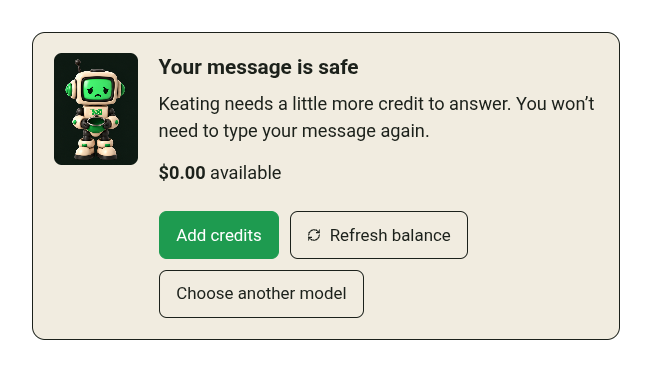
When the credit panel says Your message is safe, Keating has kept the message for recovery. You do not need to type it again.
If the account is restricted, adding credit may not resolve the restriction. Follow the account message before trying another payment.
- Choose Refresh balance to check whether enough credit is available.
- If purchases are offered, choose Add credits, select one of the displayed one-time packs, and continue to checkout. Review the amount before completing payment.
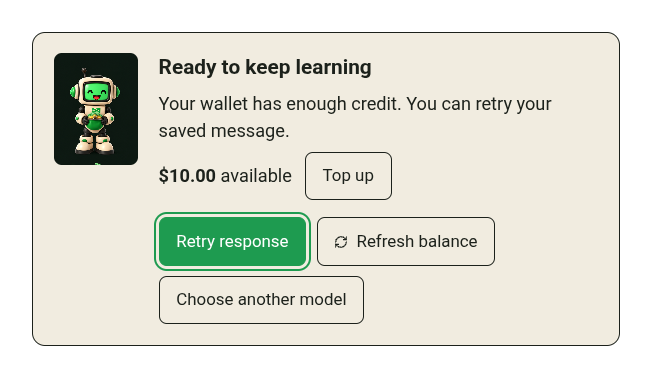
- Return to Keating after checkout and choose Refresh balance. The wallet confirms the balance; returning from a payment page is not itself confirmation.
- When Retry response appears, use it to resume the saved message. Choose another model is available if you would rather use another connected provider.
Read purchase availability in the app
Credit packs are one-time top-ups. A subscription is a separate offer. Check the current pricing page and the options actually enabled for your account before choosing either.
If the app says Credit purchases aren't available right now, a pricing description is not an active checkout. You can refresh your balance, use any confirmed starter credit, or choose another model.
Use the same account on another device
Your credit balance belongs to your account. Connect the same account on each device where you want to use it.
Your local lesson library and provider-key settings are separate. Signing in on a new browser does not automatically restore them. Export your learning data from the original browser and import it on the new one, then reconnect the providers you need.